
WP Project Manager Integration
WP Project Manager can use the departments and employees of the WP ERP HR module. The integration adds two features:
- In WP Project Manager, you can add a full department to a project. All employees of the department become members of the project.
- In WP ERP HR, the employee profile can show the tasks of the employee.
Before you start
- Install and activate WP ERP and turn on the HR module. See Turn Modules On or Off.
- Install and activate WP Project Manager and WP Project Manager Pro. The integration is part of WP Project Manager Pro. The free version alone does not add it.
- Add your employees and put each employee in a department. See Add an Employee and Create and Manage Departments.
Add a department to a project
- In your WordPress admin, go to Project Manager → Projects.
- Click New Project.
- In the project form, select a department from the HR module.
- If you do not want all employees of the department, remove the people that you do not need.
- Save the project.
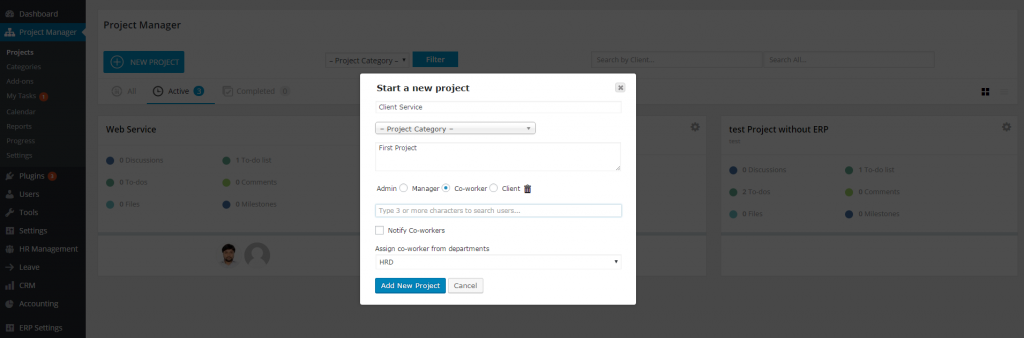
All employees of the department become project members. The head of the department becomes the project manager. To change the project manager later, open the project, click Edit, select the user, and save.
If you change the department of a project, WP Project Manager replaces the members from the old department with the employees of the new department.
See the tasks of an employee
The employee profile can show a Tasks tab. This tab shows all tasks of the employee in WP Project Manager, open and completed. It is the same list as the My Tasks page of the employee.
- Go to WP ERP → HR → People → All Employees.
- Click the name of an employee.
- Open the Tasks tab.

In WP ERP 2.0, the Tasks tab shows only on the classic HR screens. The new HR screens do not show it yet. To use the tab, an administrator can set WP ERP → Settings → HR → HR Admin Interface to Classic interface for everyone or Let each user choose. With Let each user choose, each user can click View legacy version at the bottom of the HR screens. See HR Settings.
What changed in 2.0
- WP ERP 2.0 has new HR screens. The Tasks tab from WP Project Manager Pro is not on the new employee profile. It is still on the classic employee profile.
- Adding a department to a project works as before. It uses the departments and employees of the HR module.
- The integration needs WP Project Manager Pro. The old doc did not say this.